Infra Map
See Your Entire Infrastructure on a 3D Globe
See Your Entire Infrastructure on a 3D Globe
Overview
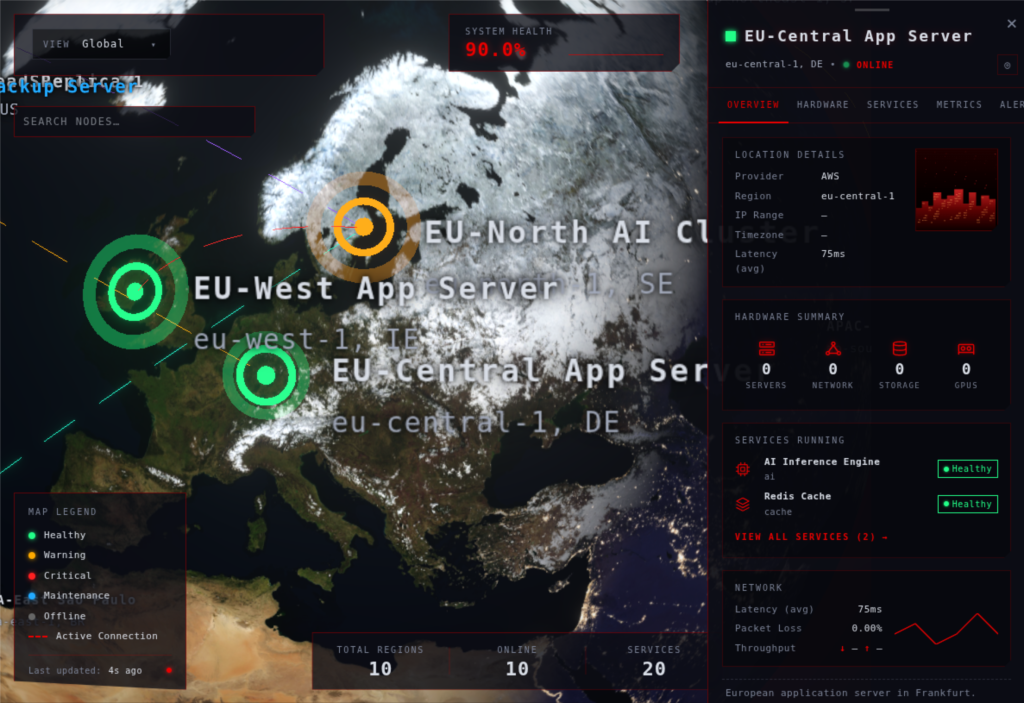
Infra Map turns your distributed infrastructure into a cinematic 3D visualization. Infrastructure nodes appear as glowing markers on a dark, cyberpunk-styled globe, connected by animated arcs that represent your network topology. Click any node to pull up a slide-out drawer with hardware specs, service listings, metrics, and real-time alerts.
This is a WordPress plugin that gives operations teams, DevOps engineers, and infrastructure architects a visual command center. Instead of scrolling through spreadsheets or dashboard lists, your team sees the full picture. Where your servers are. How they connect. What is running on each one. What needs attention right now.
Data flows from WordPress custom post types through a REST API to a React frontend built with Three.js and react-three-fiber. Polling-based updates keep the visualization current, and the pluggable metrics source means you can start with manual data entry and swap in automated agent feeds later without changing the frontend.
Who It’s For
- Infra Map is built for teams that manage distributed infrastructure and need a single visual reference.
- DevOps and SRE Teams — Monitor globally distributed services and connections from one dashboard
- Infrastructure Architects — Document and visualize network topology for planning and presentations
- Security Operations — See attack surface and connection paths across cloud regions
- Cloud Teams — Track multi-region deployments across AWS, Azure, GCP, and other providers
- Executive Dashboards — Display infrastructure status in war rooms, conference displays, or client portals
- Documentation — Replace static network diagrams with a living, updating visualization
Why Infra Map
Static infrastructure diagrams go out of date the moment you deploy something new. Infra Map stays current because it is powered by live WordPress data. Add a server, create a connection, update a metric, and the globe reflects it. The 3D visualization makes complex topologies instantly understandable, and the HUD overlay puts critical status information where your team can see it without clicking through multiple dashboards.
Technical Highlights
- Frontend — React + TypeScript with react-three-fiber (Three.js), @react-three/drei, and @react-three/postprocessing
- State Management — Zustand for reactive global state
- WordPress Backend — Custom post types, meta boxes, settings page, REST API with CORS
- Data Polling — Configurable polling interval (default 15 seconds) with cache TTL
- Region SVGs — Auto-generated region marker SVGs for US, EU, APAC, and SA cloud regions
- Stretch Goals — Cluster grouping, WebSocket/SSE updates, attack event playback, heatmaps, time-travel mode
- License — GPLv2 or later